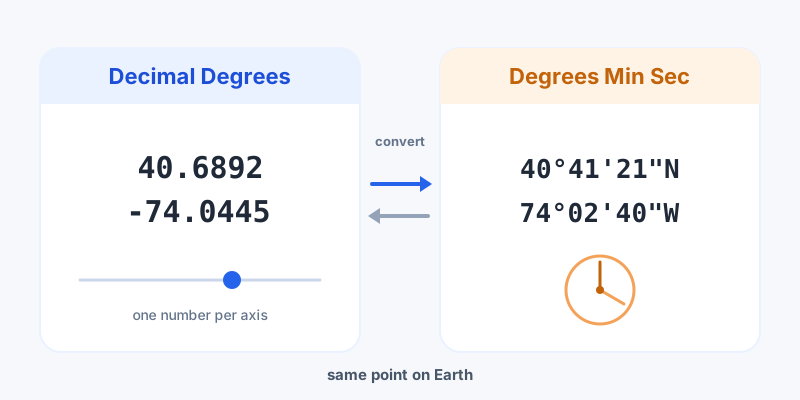
If you've ever copied coordinates from one map and pasted them into another only to land in the wrong country, the culprit is almost always a format mismatch. Latitude and longitude can be written two main ways: decimal degrees (DD) and degrees, minutes, seconds (DMS). They point to the exact same spot on Earth; they just look completely different. Here's how to read both, convert between them, and choose the right one.
The same point, two notations
Take the Statue of Liberty. In decimal degrees it's 40.6892, -74.0445. In DMS it's 40°41'21"N, 74°02'40"W. Identical location, different writing system.
- Decimal degrees use one number with a decimal point per axis. The sign carries direction: positive is North/East, negative is South/West.
- DMS splits each degree into 60 minutes, and each minute into 60 seconds — the same base-60 system we use for clocks. Direction is shown with an N/S/E/W letter instead of a sign.
Decimal degrees are the default for digital tools: GPS receivers, mapping APIs, and most apps store and exchange coordinates this way because plain numbers are easy to compute with. DMS is the traditional format you'll still see in surveying records, nautical and aviation charts, and older atlases. If you just want your current position in a clean, copyable form, the live latitude and longitude readout shows decimal degrees instantly.
Converting DMS to decimal degrees
The formula is simple: divide minutes by 60, seconds by 3,600, and add everything to the whole degrees:
decimal = degrees + (minutes ÷ 60) + (seconds ÷ 3600)
Worked example for 60°35'15":
- 60 + (35 ÷ 60) + (15 ÷ 3600)
- = 60 + 0.5833 + 0.0042
- = 60.5875°
One rule trips people up: for South latitudes and West longitudes, make the result negative. So 74°02'40"W becomes -74.0444. To skip the arithmetic, the DMS to decimal degrees converter handles the sign and rounding for you.
Converting decimal degrees to DMS
Going the other way, peel the value apart in reverse:
- Degrees = the whole-number part (78 from 78.2006).
- Minutes = the fractional part × 60, take the whole number (0.2006 × 60 = 12.03 → 12).
- Seconds = the leftover fraction × 60 (0.03 × 60 ≈ 2).
So 78.2006° becomes roughly 78°12'02". The sign decides the hemisphere letter — negative longitude is W, negative latitude is S. The decimal to DMS converter does this in one click, and if you have a whole batch of mixed formats to clean up, the general coordinate converter takes any input and outputs DD, DMS, UTM, or MGRS.
Precision: what the digits actually mean
In decimal degrees, every extra decimal place narrows your location roughly tenfold. Knowing this helps you avoid both false precision and being too vague:
| Decimal places | Approx. precision (at equator) | Pinpoints |
|---|---|---|
| 2 | ~1.1 km | A town or large neighborhood |
| 3 | ~110 m | A village or city block |
| 4 | ~11 m | An individual building |
| 5 | ~1.1 m | A specific doorway or tree |
| 6 | ~0.11 m | Survey-grade detail |
For everyday use, 5 to 6 decimals is plenty — consumer GPS and satellite imagery can't reliably resolve anything finer. In DMS, the seconds value carries the equivalent fine detail, which is why surveyors often add decimal seconds (e.g. 21.4").
Which format should you use?
- Pick decimal degrees for software, spreadsheets, APIs, sharing a link, or anything a computer reads. It's compact and unambiguous.
- Pick DMS when a chart, legal land description, or device expects it, or when you're matching an existing record.
Once your coordinates are in a consistent format, the rest is easy: measure the distance between two points, turn coordinates into a street address, or share your exact spot with a link. The format is just the wrapper; under it, you're always describing one precise point on Earth.