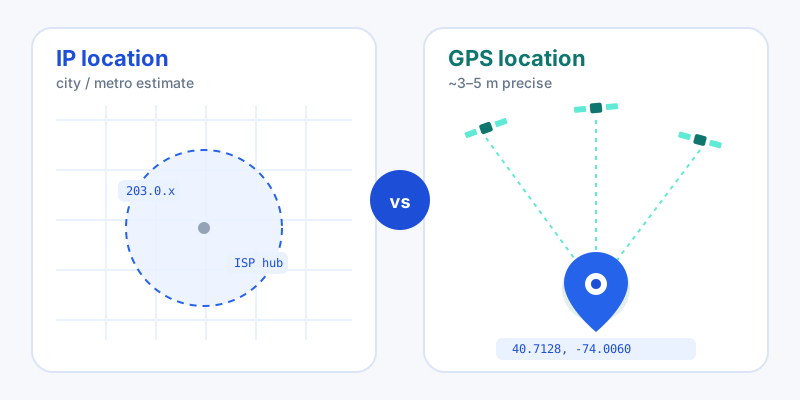
Open a website that guesses your location and you might see your city right — or a town 50 miles away. Open a maps app and the blue dot lands on your exact street. Same device, wildly different results. The reason is that they use two completely different technologies: IP geolocation and GPS. Understanding the gap explains why your "location" is sometimes a bullseye and sometimes a wild guess.
How IP geolocation works
Your IP address is a network identifier, not a coordinate. It contains no built-in location data. Instead, geolocation providers build databases that map blocks of IP addresses to places, using clues like regional internet registry allocations, ISP routing data, and known network infrastructure. When a site looks up your IP, it's reading a best-effort estimate from one of those databases, essentially asking "where does this network usually live?" rather than "where is this device right now?"
That's why IP location is fast and works on any connection without permission prompts, but it tops out at city or metro-level precision. You can see exactly what your IP reveals with our tool that shows your public IP address, and dig into the city, region, and ISP behind any address using the IP address lookup tool.
How GPS works
GPS is the opposite approach. Your device's receiver listens to signals from a constellation of satellites and calculates its own position by triangulating their timing. The location is computed on the device itself, from physics rather than a lookup table, so it can be accurate to roughly 3 to 5 meters in open conditions.
On phones, "GPS" is usually shorthand for a blend of satellite signals, nearby Wi-Fi access points, and cell towers, fused together for a faster, more reliable fix, especially indoors. This is what the browser's Geolocation API taps into when you allow location access. To see a precise device fix in action, the tool that finds your current location on a map uses this method, and you can read off the exact figures with our latitude and longitude finder.
Accuracy side by side
| Factor | IP geolocation | GPS / device location |
|---|---|---|
| Typical precision | City / metro (often tens of km off) | ~3–5 meters outdoors |
| Data source | IP-to-location databases | Satellites + Wi-Fi + cell |
| Permission needed | No | Yes (user must allow) |
| Works indoors | Yes (but coarse) | Sometimes weak; Wi-Fi helps |
| Best for | Content, currency, fraud signals | Navigation, sharing your spot |
Country-level IP accuracy is excellent — well over 99%. But the more specific you get, the more it degrades: independent testing tends to put city-level accuracy somewhere in the 55–80% range, and tighter "within 10 km" accuracy drops considerably lower.
Why your IP location is often wrong
If an IP lookup places you in the wrong city, it's usually one of these:
- ISP routing. Providers assign IP ranges to regional hubs, so the database records the hub — not your house.
- Mobile networks. Cellular traffic backhauls through regional gateways, so an LTE connection can geolocate to a city far away.
- VPNs and proxies. These deliberately route you through another location, which is the whole point.
- Rural and small-town gaps. Sparse data means fewer signals to validate against, so estimates wander.
None of these are bugs; they're inherent to inferring location from a network address.
When to use each
Choose based on what you actually need:
- Use IP location for low-stakes, no-permission tasks: showing local content, picking a default currency, or rough fraud and analytics signals.
- Use GPS / device location whenever precision matters: turn-by-turn navigation, logging a trailhead, or sharing exactly where you are with someone.
Once you have a precise fix, you can do more with it. Convert the reading between formats with the coordinate format converter, generate a short shareable Plus Code for any spot, or send a friend a live link using the location sharing tool. The short version: IP tells the internet roughly where your network is; GPS tells you precisely where you are. Pick the one that matches the job.